Get in touch
WhatsApp: +90 547 470 40 40
Email: destek@mostuned.com
Instagram: @mostuned
Istanbul · Monday–Saturday 09:00–18:00 (TR time) · Remote service by appointment

You do not need to drop the car off, remove the ECU or post anything. We prepare the calibration and sign it against your chassis number; you do the writing yourself, in your own driveway, from your phone.
Four steps. Your car never leaves you.
Required hardware: an iPhone plus a USB-C to Ethernet or WiFi-ENET adapter. Verified coverage: Turkish-market BMWs with the 1.6L B48B16 (1,597 cc / MG1CS003 ECU) engine — 320i (G20), 420i (G22/G26), 520i (G30) and X3 sDrive20i (G01). Coverage is expanding and will be announced here; ask anyway if your car is not listed. Prerequisite: BMWs built after June 2020 need the ECU unlocked. The app checks this for free the moment it connects; if it is locked, we do the unlock — every day, at our workshop. See Unlock service.
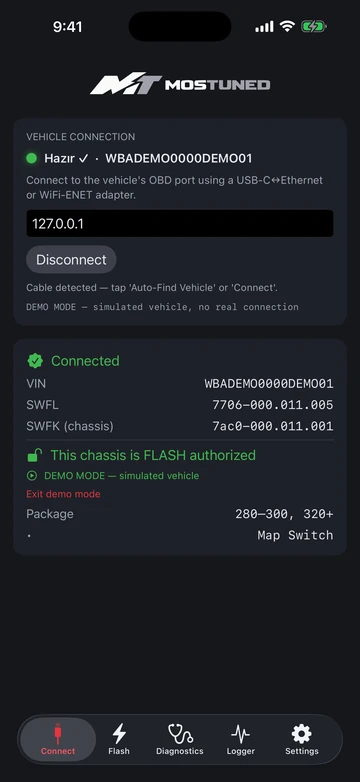
Preparing the calibration and writing it to the car are two separate steps. We handle the preparation and every safety check on our side; the app only does the last step — writing to your car.
Your file is yours alone: it is prepared for your chassis number and downloaded through a single-use link. Another car cannot use it, and it cannot be copied or passed on.
Connect the car and the app reads your chassis number. The calibration prepared for your car downloads and you write it from your own phone.
The write sequence runs step by step inside an open programming session, and every step's response is verified. Dropping battery voltage is the most common real risk, which is why we ask you to check the battery or put the car on a charger first. The process and its risks are set out in detail in our disclaimer.
Yes. The app needs internet to verify authorisation and download the calibration. The connection to the car itself is local, over the adapter.
No. Authorisation is bound to the chassis number and the file is signed for that VIN.
The app is coming for iPhone (iOS). Any Android plans will be announced here.
The app is available to everyone; install it through TestFlight. See installation steps.
WhatsApp: +90 547 470 40 40
Email: destek@mostuned.com
Instagram: @mostuned
Istanbul · Monday–Saturday 09:00–18:00 (TR time) · Remote service by appointment
Send your model, hardware and goal — we will pick the right package together. We do not sell what does not fit.